
Finding a Common Date With Friends
To find a date that works for everyone, you don’t need a poll: create a group in To Gather, open “View availability”, and the best slot comes out on its own.
- 1
Add your friends — create a group in To Gather in a few seconds.
- 2
Check their availability — the heatmap cross-references calendars and colours each day: green everyone is free, orange some, red nobody.
- 3
Pick the slots that work for everyone — you confirm, and the invite goes out to the group.
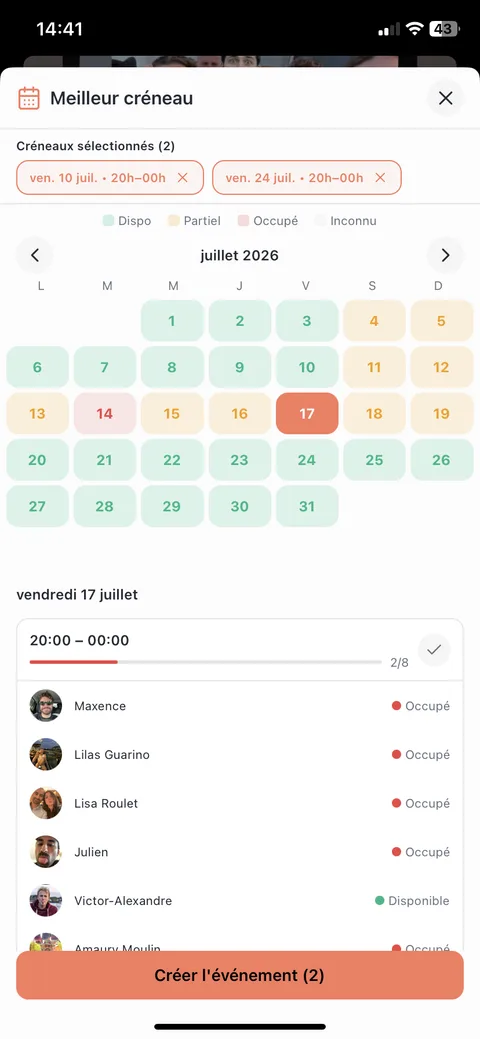
Simple and effective: no manual entry, real-time updates whenever a calendar changes, an instant visual read. For a one-off poll with people who don’t have the app, Doodle or Framadate will do — the comparison below covers the differences.
The Perfect Time Slot, Visible at a Glance
In To Gather, the heatmap colours each day by how many people are free: green for the whole group, orange for some, red for nobody. You spot the date at a glance, with no grid of ticks to decode.
Why Is It So Hard to Pick a Date With a Group?
The difficulty grows faster than the number of people. At three, one message is enough. At five, you already have to chase the quiet ones. At ten, keeping a table up to date becomes impossible: a single change invalidates every answer already given.
That is why teams at work run on synced calendars — and why the same logic applies to a group of friends past five people.
Setting a common date: the 4 steps
The sequence is the same whatever the tool. What changes is how many steps are left for you to do.
List the participants and the time window
Decide who needs to be there (3, 8, 20 people) and the window you are aiming at: "this week", "before the end of the month", "a Saturday in the next six weeks".
Collect everyone's availability
This is the step that stalls. To Gather removes it: connected calendars cross-reference themselves, in real time. Failing that, there is still the manual poll (Doodle, Framadate) or asking everyone for their calendar.
Cross-reference and pick the slot
Spot the slots where the most people are free. A heatmap makes this instant; a poll grid still needs reading row by row.
Confirm and notify
Lock the date and tell everyone from the app, with an automatic reminder the day before. Nobody has to copy the event into their own calendar.
What Is an Availability Heatmap?
A heatmap colours each day by the share of the group that is free. The greener it is, the more people are available — you read it instantly, where a grid of ticks has to be counted column by column.
The circled days (10 and 24) are the ones where the whole group is free — the organizer taps one of them to confirm.
Which Method Should You Choose? Comparing the Five Options
A comparison of the five most common ways to lock in a group date.
| Criteria | To Gather | Doodle | Framadate | WhatsApp poll | Shared calendar |
|---|---|---|---|---|---|
| No manual data entry | |||||
| Real-time updates when a calendar changes | |||||
| Heatmap-style view | |||||
| Works for 10+ people | |||||
| Reminder notifications | |||||
| No calendar details shared | |||||
| 100% free |
Legend: yes · partial · no.
Which Method Fits Which Type of Group?
A Night Out With Friends (5–10 people)
Calendar sync + heatmap. Past 5 people, a manual poll gets tedious and replies drag on. To Gather is built exactly for this case.
A Family Gathering (3 Generations)
Calendar sync for the working-age crowd, a manual poll for seniors less comfortable with mobile apps. Hybrid mode: create the event in To Gather and share the web link with anyone who doesn't have the app.
A Weekly Activity (Football, Classes, a Club)
Recurring event. To Gather recalculates the heatmap for each occurrence; a shared calendar only works if the slot never moves.
A Student Group Project
To Gather if the group sticks together for a whole term — revision, projects, nights out: calendars stay connected from one time to the next. For a single one-off poll, Framadate will do.
A Weekend or Trip (3+ Days)
A heatmap is a must — manually comparing 30 candidate days is impossible past 4 people. To Gather lets you filter for “everyone free from Friday to Sunday.”
A Surprise Birthday Party
To Gather has a "secret chat" the guest of honour cannot see, so you can plan without slipping up in the group conversation. Failing that, a private poll the person is simply not invited to.
Frequently Asked Questions About Picking a Group Date
What's the best way to find a date that works for a group of friends?
From five people up, the most effective method is to let calendars cross-reference themselves and read a heatmap: no chasing, a decision in seconds. That is what To Gather does. Below four friends who see each other often, a message in the group chat still does the job. And for a one-off poll with people you will not see again — a club meeting, outside speakers — Framadate remains handy.
How do you set a date with a large group without it taking all week?
Three principles: narrow the window you are aiming at ("before the end of the month" rather than "this summer"), set a short deadline for replies (48 hours, not a week), and let a tool cross-reference calendars instead of waiting for everyone to type their availability. Once calendars are connected, the decision takes thirty seconds.
How can I find a common date without using Doodle?
To Gather is the alternative that removes the typing: each person connects their calendar once, the app works out the group’s availability and surfaces the best slot. If you just want a web poll with nothing to install, Framadate (no account, hosted by Framasoft) does the job — but everyone ticks their availability by hand, and you still have to chase.
Is there an app that automatically finds the date that works for everyone?
Yes. To Gather reads each participant’s native calendar — which can itself aggregate Google Calendar, Outlook or iCloud — and shows a heatmap for the group. No manual entry, and the heatmap updates as soon as someone’s calendar changes. The app is free, on iOS and Android.
How do I share my availability without revealing what's actually on my calendar?
To Gather only exposes busy/free blocks — never the title, description, location, or guest list of an event. Your friends see a slot marked “busy” without knowing anything about what you're doing. You can turn off sharing at any time, and the associated data is deleted immediately.
Do all the participants need to use the same app?
For automatic syncing, yes: each participant installs To Gather and connects their calendar. For an occasional guest, a web link lets them answer by hand, like on Doodle — no sync, but nothing to install either.
How long does it take to lock in a common date with To Gather?
Once calendars are connected, finding the right slot takes seconds — the heatmap immediately shows the days when everyone's free. The total time mostly depends on how quickly each participant turns on sync — expect 5 to 10 minutes if the whole group does it right after getting the invite.
What's the best solution for a weekend or vacation with friends?
For multi-day windows, a heatmap is the only readable option: across 30 candidate days and 6 people, a Doodle-style table becomes unreadable. To Gather lets you filter for windows like “X consecutive days where everyone's free.” Failing that, a shared Google calendar can work if every participant is on Google.
Ready to Lock In Your Next Date?
Install the app, connect your calendar: the next slot will surface on its own.
Free · no ads · iOS & Android
Also worth reading
Create an event by voice
Also worth reading