
Plan a surprise birthday party without spoiling it
A surprise party isn't won on the decorations. It's won on three things: finding a date the group can actually make, talking about it somewhere the guest of honour doesn't read, and stopping an "I'll be there 🎉" from landing in the wrong chat.
- 1
Create the outing without them — an outing created from a regular account is private. It shows up on no profile and in no directory: only the host, co-hosts, attendees and invited guests can see it.
- 2
Invite by link — everyone replies yes / maybe / no from their browser, with no app to install and no account to create. Replies land in the outing, not in the group chat.
- 3
Let the date surface on its own — connected calendars cross-reference each other and the "Best slot" view colours the evenings when everyone is free. You confirm, and everyone is told.
- 4
Sort the gift separately — the outing's secret chat is open to the guests and closed to the host — a rule enforced by the database, not by a display setting.
The weak point is the same whatever tool you use: the conversation. As long as the planning lives in a message thread, one careless add ruins it. A separate outing, with its own guest list, removes the risk at the root.
Where the surprise leaks, every single time
Three leaks come up again and again. None of them is a matter of discretion — they're tooling accidents.
The group chat
There's always someone who adds the guest of honour "because they'd have found out anyway". A group grows with two taps; a guest list doesn't.
The reply in the wrong place
"I'm free on the 12th!" posted in the shared chat instead of the planning thread. It's the most common leak, and the silliest.
The availability round
Asking twelve people when they're free without saying why raises suspicion by the third one. Cross-referencing calendars asks nobody anything.
The 4 steps, in order
The order matters more than the content: each step removes one chance to give the game away.
Pick a window, not a date
"A Saturday before the end of the month" beats "the 12th". A date chosen before you know who's free means half the group can't come — and one more round of chasing, so one more chance to leak.
Create the outing privately
From a regular account the event is private and stays that way: there is no "make it public" switch. The guest of honour can't stumble on it, even if they follow you in the app.
Invite by link, outside the group
You share the outing's link with whoever you want, one by one or in a separate chat. Everyone replies from the link, and the guest list keeps itself up to date.
Confirm the date and let the reminders run
Once the slot is settled, the app tells whoever installed it and nudges them the day before; everyone else gets the link again from you. Nobody has to write "so, are we good for Saturday?" where they shouldn't.
The group gift, in a thread the host can't read
To Gather has a "secret chat": a thread attached to the outing, open to every guest and closed to the host. That restriction isn't a display setting — it's enforced by the database, which refuses to serve the thread to the event's host.
They're throwing their own party
The common case: the birthday person creates the event, so they're the host. The secret chat is built for exactly this — agreeing on the gift, the decorations, the arrival time, without them reading a single line.
You're throwing the surprise for someone
Here the host is you, so the secret chat shuts out you, not them. Pointless in that direction — and unnecessary anyway, since the guest of honour isn't invited to the outing and sees nothing of it. The thread stays open to your guests if they want to plan something for you.
One nuance to know before relying on it: the secret chat shuts out the outing's host, who isn't always the person you're trying to keep in the dark.
Finding the date without asking the guest of honour
This is the step that stalls, and the step that gives the surprise away. In To Gather, guests who have the app connect their calendar once: the "Best slot" view colours every day by how many people are free — green everyone, orange some, red nobody. Nobody has to answer a poll, so nobody has to wonder why you're asking.
Those without the app tick their evenings straight from the outing's link. Both kinds of answer feed the same view.
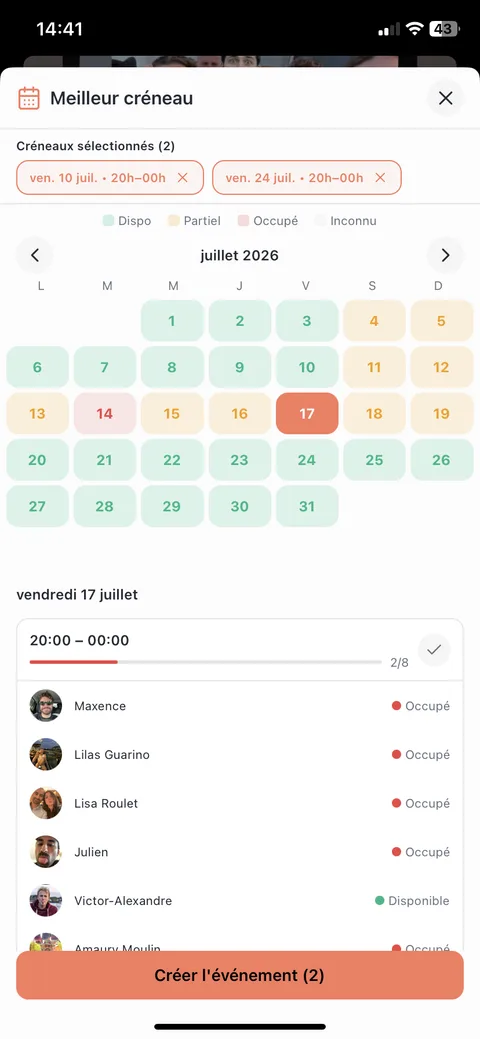
Calendars never read each other: your friends see a slot marked "busy", never the title, place or attendees of an appointment.
Your guests have nothing to install
This is what makes a surprise workable at fifteen people: you don't have to talk fifteen people into installing an app before you can ask whether they're free. The outing's link is enough — replying, changing their mind, ticking slots and sending a photo on the night all happen in the browser, with no account.
On the night: the photos, then the guest book
During the party, a photo prompt goes out to the guests. Everyone captures their moment, and nothing appears: the album opens all at once at 6pm once the night is over, for everyone who was there. It's the part nobody thinks to organise and the part that's always missing the next day.
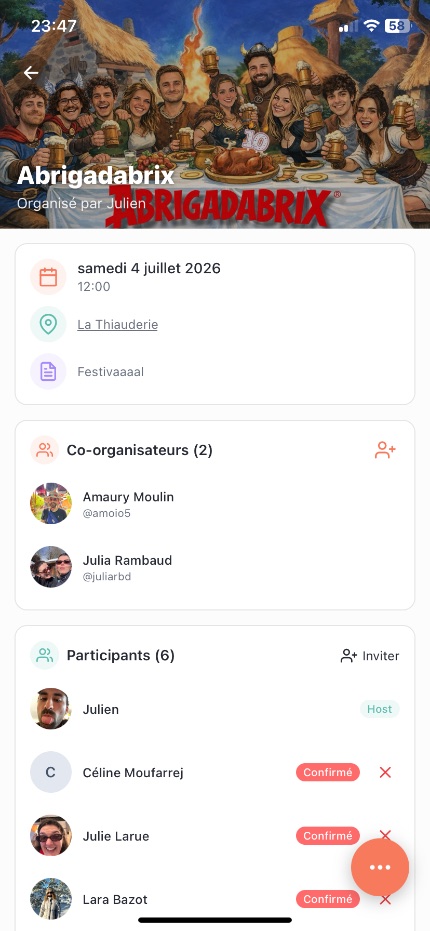
The guest book, which you switch on for the outing, works the same way: everyone leaves a note during the party, and it only opens when the photos are revealed. Only the host and their co-hosts read it — for a birthday, it's the gift nobody planned.
Timeline: from D-30 to the morning after
Calibrated for about ten guests. At twenty, shift everything by a week.
| When | What you do | Where it happens |
|---|---|---|
| D-30 | Settle the window ("a Saturday in November") and the guest list. | Nowhere yet — and certainly not in the group chat. |
| D-21 | Create the outing privately and send the link, one person at a time. | To Gather |
| D-14 | Read the cross-referenced availability, nudge the quiet ones privately, confirm the date. | "Best slot" view |
| D-10 | Open the secret chat for the gift, if the birthday person is the host. | The outing's secret chat |
| D-2 | Spell out the real arrival time — the one that leaves room to hide. | The outing's thread |
| The day | Nothing. The photo prompt goes out on its own during the party. | Automatic |
| D+1 | The album and the guest book open for everyone. | Automatic |
Surprise birthday party: frequently asked questions
How do you plan a surprise birthday party without them finding out?
Move the planning out of the chat it currently lives in. As long as everything sits in a group chat, one person adding them — or one guest replying in the wrong place — ends it. In To Gather you create a private outing with its own guest list: the replies, the date and the messages stay there, and the birthday person has no way of stumbling on it. Second rule: never ask anyone for their availability by message — let the calendars cross-reference each other, and nobody has to wonder why you're asking.
How do I find a date without asking the guest of honour?
Aim at a window rather than a date, and cross-reference the guests' calendars. In To Gather, those with the app connect their calendar once and the "Best slot" view surfaces the evenings when everyone is free; those without it tick their evenings from the link. The birthday person isn't in the outing, so they're never asked. If their own schedule matters, get their busy evenings out of them under some other pretext — that's the one moment you have to lie.
How far in advance should I start?
Three weeks for around ten guests, four to five beyond fifteen. It isn't the preparation that takes time, it's the replies: the bigger the group, the longer the tail of undecided people. Give a short deadline for answers (48 hours) rather than a distant one — a long deadline doesn't get you more replies, it just gets them later.
Do my guests have to install the app?
No. The outing's link is enough: from their browser, with no account and no download, your friends reply yes / maybe / no, change their mind later, tick the slots that work for them and send their photos on the night. The app adds the rest — calendar syncing, automatic reminders, the group chat and the album you can browse afterwards.
Can the event show up publicly anywhere?
No. An outing created from a regular account is private and there is no switch to make it public: the rule is enforced server-side. It doesn't appear in the public events directory, nor on your profile for someone who follows you. Only the host, the co-hosts, the attendees and the invited guests can see it. Professional accounts — bars, running clubs — are the only ones that can publish open events.
How do we collect the money for the group gift?
To Gather handles neither a money pot nor expense splitting, and doesn't plan to. The secret chat is where you agree on the what, the how much and who fronts it; the collecting itself happens with whatever tool your group already uses. That's one step fewer in the app, not one step fewer in real life — better to say so plainly.
What if someone spills it in the WhatsApp group?
No app can stop that — but it can make sure there's nothing to spill. If the planning, the replies and the date live in a separate outing, the group chat holds nothing that can be copied across by mistake. The only discipline left: never answer a planning question in the shared group.
Can I create the outing by voice to go faster?
Yes. You dictate one sentence — "surprise birthday for Camille, a Saturday in November, at mine" — and the app pulls out the title, the date, the place and the guests. Everything stays editable before you confirm, and nothing is sent until you do.
The date, the guests, the gift: in one place, far from the group chat.
Install the app, create the outing privately, send the link. Your friends reply with nothing to install.
Free · no ads · iOS & Android
Read next
Finding a common date with friends
Read next
Inviting friends without making them install the app
Read next